Quick guide for creating action and filter hooks
Pre-requisites:
- Understand how to create a plugin in WordPress.
- Know when to use WordPress plugins with hooks.
This short and simple article is to guide readers on how to create hooks, namely action hook and filter hook. This article breaks down a few sections as follows:
Two types of hooks in WordPress
The hooks are used so that WordPress plugins could interact with its core code.
- Action hooks - to add or remove functions
- Filter hooks - to modify data that is produced by functions
Generally, they can help with reducing lines of codes, and improving code modularity and maintainability.
The flow of this article
- Why Action Hook?
- Creating Action Hook
- Why Filter Hook?
- Creating Filter Hook
- References
Why Action Hook?
When you visit any page of a WordPress website, a series of PHP functions (named actions) are called at various points, and they are attached to action hooks. Using the action hooks provided by WordPress, you can add your own functions to the list of actions that run when any action hook is called, and you can also remove pre-existing functions from any action hook. Action hooks dictate when the actions are called. Before the closing
</head>tag of any page, the wp_head() action hook is called, and the actions that are hooked to wp_head() are run.
Creating Action Hook
add_action($tag, $function_to_add)
What are the arguments inside of the above Action Hook?
$tag- the name of the action to which the function you're hooking to.$function_to_add- it's a callable function, which is the name of your callback function.
How to create it?
- Locate the provided
pluginsdirectory in your WordPress project. - Create a new folder named
your-plugin-nameand a file inside of it with the same folder nameyour-plugin-name.php. - In
your-plugin-name.php, put the header code snippet provided below at the top just like how we would create a template. Dig deeper into header?
/**
 * Plugin Name: plugin-add-action
 * Author: Yeehan
 * Version: 1.0
 */
- Create
add_actionhook by providing the two arguments,$tagand$function_to_addas mentioned earlier.
Notice that the name of the 2nd argument is the same as the function name test_plugin.
add_action('my_plugin_tag', 'test_plugin');
// Receiving an argument as a parameter.
function test_plugin($test)
{
    // It will echo "You are in the plugin file" after passing in the parameter.
    echo '<script>';
    echo 'console.log(' . json_encode($test) . ')';
    echo '</script>';
}
- Go to your working php file in the
themesfolder, try the code as follows:
Notice that the 1st argument from add_action is the same as the 1st argument in do_action below?
// 1st argument: built-in from WordPress.
// 2nd argument: Passing into the action hook as a parameter, $test.
do_action('my_plugin_tag', 'You are in the plugin file');
- Login into your
../wordpress/wp-adminto activate the plugin.
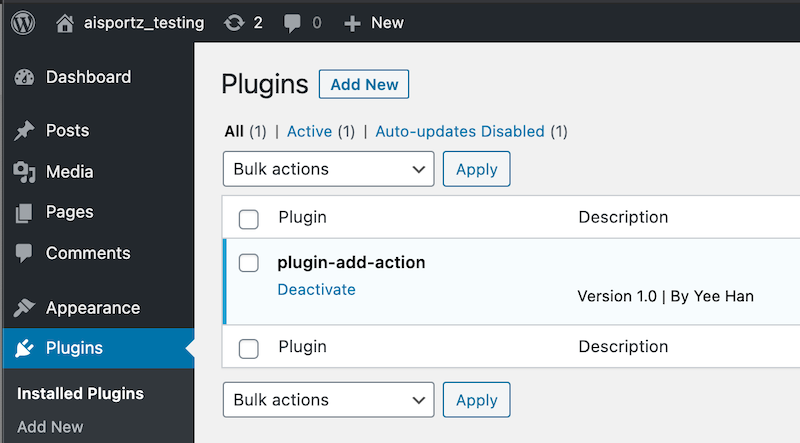
Notice that the plugin name reflects the name specified below.
/**
 * Plugin Name: plugin-add-action
 * Author: Yeehan
 * Version: 1.0
 */
- Your
php pageis now able to communicate with thepluginyou just have created. Now the parameter is beingconsole.log()in the console.
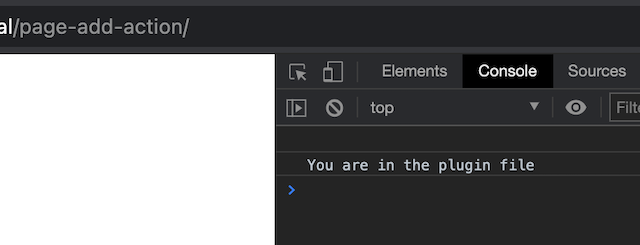
Action Hook can be more complicated than that. Some references are listed below.
References
- https://developer.wordpress.org/reference/functions/add_action/
- https://developer.wordpress.org/reference/functions/do_action/
Filter Hook
Creating a Filter Hook is very similar to smithing an Action Hook. However, there are four arguments to be passed into the hook this time, rather than two. May refer back the steps above for activating a plugin.
add_filter($tag, $function_to_add, $priority, $accepted_args)
Specifying the number of
$accepted_argsis extremely important if passing more than one arguments intodo_action()andapply_filter(). An example is provided in this article.
$tag: stringfunction: callablepriority: intaccepted_args: int
Case 1: apply_filter($tag, $value)

// Remember to specify number of accepted arguments for add_filter()
Case 2: apply_filter($tag, $value1, $value2)
$tag: string$value: mixed
Remember that..
- If you pass an array into the
Filter Hook, ensure only return an array. - Ensure passing at least one argument into
apply_filters(). - Only
Filter Hookis able to return data; array or object.
An example of apply_filters() with two different files
// Plugin file
add_filter('modify_username_action', 'modify_username_function');
function modify_username_function($username) {

    $username = "My new username";
    $newUsername = $username;
    // Return modified data
    return $newUsername;
}

// Page file
$modifiedUsername = apply_filters('modify_username_action', $username);
Combination of Action and Filter Hooks
// 2 = two arguments will be received by add_action()
add_action('add_store_id_action', 'add_store_id', 13, 2);

function add_store_id($store_user, $store_info){
    global $store_id;
    $store_id = $store_user->ID;
    // Add a Filter Hook
    add_filter('wc_product_table_query_args', 'wcpt_custom_query_args', 10, 2);
}

function wcpt_custom_query_args($args, $product_table) {
    global $store_id;
    // do something with $args
    $args += array('author' => $store_id);
    // return the array
    return $args;
}
Want to overwrite theme file from filter plugin?
References for Filter Hook
General references that I found useful
Last edited Feb 15, 2021